What are the free channels, and do they really cost nothing?
Our Google TV line offers up to 1,000 free channels that play live news, movies, kids' shows, sports, and classic TV around the clock. They really cost nothing — there is no monthly bill, no trial period, and no credit card needed to watch them. These channels are paid for by normal commercial breaks, just like regular broadcast television.
Which streaming apps are included?
The Google TV line includes the apps people ask for most: Netflix, YouTube, Hulu, and Prime Video. These apps are ready to use right from the main screen without any tricky workarounds. If you already pay for an account with Netflix, Hulu, or Prime Video, you just sign in with your existing password, and YouTube works right away for free.
What do I need in my house to use the Google TV line?
Once the projector is set up, all you need is Wi-Fi. You do not need to run cable wires through the walls, buy an antenna, or hook up a separate media player. As long as you have a working home Wi-Fi connection, you can watch the free channels and open the built-in apps.
Le Mark III Elite est-il un projecteur natif 4K?
Non. Il projette une image Full HD et accepte des sources 4K. Pour une résolution native 4K, consultez le Mark V.
La mise au point est-elle automatique?
Oui. La mise au point automatique et la correction trapézoïdale automatique aident à obtenir une image nette et droite.
Convient-il à une petite pièce?
Oui. Sa courte focale permet une grande image en étant plus près du mur. Vérifiez l’espace disponible et la taille d’image souhaitée.
Puis-je dupliquer l’écran de mon téléphone ou de mon ordinateur?
Oui. Il prend en charge la duplication d’écran sans fil depuis des téléphones, tablettes et ordinateurs compatibles, avec Wi-Fi et Bluetooth.
Quels sont les délais de livraison?
La livraison est gratuite partout au Canada. La plupart des commandes arrivent de 2 à 4 jours ouvrables après l’expédition; les adresses rurales et éloignées peuvent demander plus de temps.
Puis-je le retourner?
Oui. Pour un achat sur biglybrothers.com, ce produit bénéficie de retours gratuits pendant 90 jours et d’une garantie de 3 ans. Nous envoyons une étiquette de retour prépayée par courriel. Pour commencer, écrivez à support@biglybrothers.com avec votre numéro de commande.
What is Google TV on a projector?
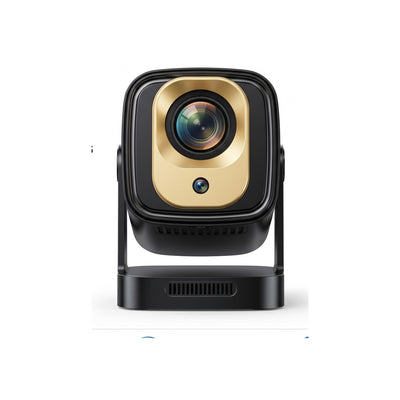
Google TV is the built-in smart menu system that comes right inside our Mark III line of projectors. Instead of plugging in extra gadgets to find a movie, you turn on the projector and see all your shows, movies, and live channels organized on one simple home screen. It works just like a smart television, only the picture is beamed onto your wall.
Do I need a smartphone or computer to play movies on it?
No, you do not need a phone, tablet, or computer to make it work. Because Google TV is built in on the Mark III line, the projector connects directly to your Wi-Fi and plays shows all by itself. That means you never have to worry about phone calls or texts interrupting your kids' movie night.
Do I need a cable box or satellite dish to get the live channels?
No, you do not need a cable box, a satellite dish, or a monthly cable company contract. The up to 1,000 free channels stream straight over your home Wi-Fi connection. You get the feeling of flipping through live TV channels without paying a cable bill or scheduling an installer.
Do I need to create accounts or pay subscriptions to watch the free channels?
You do not need to pay for a subscription to watch the up to 1,000 free channels, and YouTube can also be watched for free. Paid apps like Netflix, Hulu, and Prime Video are included on the projector, and those specific apps only require a login if you choose to use your own paid memberships with them. If you never want to spend a dime on subscriptions, you still have plenty to watch for free over Wi-Fi.
How is this different from a regular projector with a streaming stick plugged into the back?
A regular projector requires you to buy a separate streaming stick, plug it into the back, find an extra power cord for the stick, and juggle two different remotes. With Google TV built in on the Mark III line, everything is already inside the projector in one tidy unit. You turn it on and go straight to your shows without messy dangling cords or extra parts to lose.
Can I still plug other devices into a Google TV projector if I want to?
Google TV built in means you do not need to plug anything else in just to watch movies and shows. If you do want to connect something else, such as a game console, check the connection options listed for the model you are buying, because those differ from model to model.
How do I pick what to watch on Google TV?
When you turn on the projector, you see a clear visual screen with rows of shows, apps, and live channels. You simply move across the screen to click on Netflix, YouTube, Hulu, Prime Video, or browse through the guide of up to 1,000 free channels. Everything is labeled in plain English with picture tiles, so kids and grandparents can find a movie without getting lost in menus.
Does the Google TV feature work without Wi-Fi?
No, the Google TV apps and the up to 1,000 free channels will not work without an internet connection. To stream Netflix, YouTube, Hulu, Prime Video, or the free channels on the Google TV line, all you need is Wi-Fi, and that Wi-Fi connection is required whenever you stream. If you take the projector somewhere without Wi-Fi, the online channels and streaming apps will not load until you are connected again.
Who is a Google TV projector best suited for?
A Google TV projector suits parents and families who want big-screen movie nights without dealing with cords, adapters, or complicated tech setups. Because our Mark III line has Google TV built in, it is great for bedrooms, family rooms, and apartments where simplicity matters. If you have Wi-Fi and a dim room in the evening, you have everything you need for a family theater.