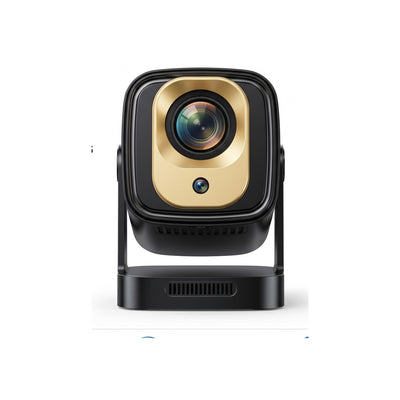
White and black Mark III Elite Google TV projector on its stand, headed Your TV. On any wall., with feature tiles below
Infographic: Plug in. Play on 140 inches. Couple playing a racing game beside the Mark III Elite Google TV projector
Infographic for the Mark III Elite Google TV projector: Big-screen magic, family together, with a snowy cartoon on the wall
Infographic for the Mark III Elite Google TV projector: Every app, one home screen, showing a Google TV menu and app logos
Infographic for the Mark III Elite Google TV projector: 1,000+ free live channels, showing a Google TV channel guide
Infographic for the Mark III Elite Google TV projector: Sharp 1080p, plays 4K and 8K, with 1500 lumens and HDR tiles
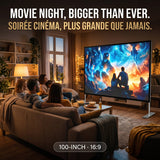
Two friends on a sofa play a racing game on a wall-sized picture; Mark III Elite Google TV projector, console via HDMI
Infographic: Movie night, look up. Couple in bed watch an aurora scene on the ceiling, Mark III Elite Google TV projector
Infographic: Make tonight a family night. Family watching a holiday movie on the wall, Mark III Elite Google TV projector
Infographic: Everything you need, in the box. Mark III Elite Google TV projector with remote, spec list and box contents

Bigly Brothers

Mark III Elite

A Google TV projector that sets itself up.

  • Google TVOfficially licensed
  • 1500Lumens
  • 140″Max picture
  • Autofocus+ auto keystone
4.3(111 website reviews)

$349.99CAD

Free shipping across Canada. Most orders arrive 2–4 business days after shipment; remote and rural addresses may take longer. Tax calculated at checkout.

5.0/511 reviews on Best Buy CanadaPremier Seller
  • Officially licensed Google TV with Netflix, YouTube and more built in
  • Autofocus and auto keystone: set it down and it sets itself up
  • Short throw: a big picture from closer to the wall, great for small rooms
  • Cast from your phone, tablet or laptop; Bluetooth for speakers
  • Built-in stand tilts so the picture lands where you want it
  • 🍁 Canadian-owned
  • Free shipping across Canada, no duty or border fees
  • 90-day free returns
  • 3-year warranty included

The Bigly promise

  • Free shipping on every order across Canada
  • Most orders arrive 2–4 business days after shipment; remote and rural addresses may take longer.
  • Free returns, no restocking fees ever
  • 90-day return window
  • 3-year warranty included with purchase
  • Premium service from real people: 1-800-616-4969
  • Pay later with Sezzle

Rated 4.3/5 by 111 website customers · Read the reviews

Top questions

What are the free channels, and do they really cost nothing?

Our Google TV line offers up to 1,000 free channels that play live news, movies, kids' shows, sports, and classic TV around the clock. They really cost nothing — there is no monthly bill, no trial period, and no credit card needed to watch them. These channels are paid for by normal commercial breaks, just like regular broadcast television.

Which streaming apps are included?

The Google TV line includes the apps people ask for most: Netflix, YouTube, Hulu, and Prime Video. These apps are ready to use right from the main screen without any tricky workarounds. If you already pay for an account with Netflix, Hulu, or Prime Video, you just sign in with your existing password, and YouTube works right away for free.

What do I need in my house to use the Google TV line?

Once the projector is set up, all you need is Wi-Fi. You do not need to run cable wires through the walls, buy an antenna, or hook up a separate media player. As long as you have a working home Wi-Fi connection, you can watch the free channels and open the built-in apps.

See all questions

Take a closer look

Mark III Elite — movie night from bed, Google TV built right in
Google TV, built right in.
Game night on the big wall.

Choose your projector

See how big it gets

Up to 140 inches, as listed.

40″140″

140″

Distance is approximate, estimated with a typical throw ratio. Your room, zoom and keystone change it.

Not sure which one?

Find your projector in 3 taps

Answer three quick questions. We only use what's on each listing.

  1. 1 Where will you mostly use it?

  2. 2 What's your budget?

  3. 3 What matters most?

Specs

Brightness
1500 lumens
Resolution
Native 1080p; plays 4K and 8K video files via HDMI stick or USB (streaming apps run at 1080p)
Picture size
Up to 140 inches
Throw
Short throw
Smart system
Google TV (officially licensed) with 1,000+ free live channels
Picture setup
Autofocus, auto keystone
Wireless
Wi‑Fi, Bluetooth, wireless screen casting
Ports
HDMI, USB
Light source
Long-life LED
Warranty
3 years, from Bigly Brothers
Returns
90-day free returns

What's in the box

  • Mark III Elite projector
  • Remote control
  • Power adapter
  • Lens cover
  • User manual

Why buy from Bigly Brothers

  • Canadian-ownedA Canadian company.
  • Free shipping on every orderMost orders arrive 2–4 business days after shipment; remote and rural addresses may take longer.
  • 90-day free returns + 3-year warrantyNo restocking fees, ever. We email you a prepaid return label.
  • Premium service from real peopleCall 1-800-616-4969 or email support@biglybrothers.com.

Questions

What are the free channels, and do they really cost nothing?
Our Google TV line offers up to 1,000 free channels that play live news, movies, kids' shows, sports, and classic TV around the clock. They really cost nothing — there is no monthly bill, no trial period, and no credit card needed to watch them. These channels are paid for by normal commercial breaks, just like regular broadcast television.
Which streaming apps are included?
The Google TV line includes the apps people ask for most: Netflix, YouTube, Hulu, and Prime Video. These apps are ready to use right from the main screen without any tricky workarounds. If you already pay for an account with Netflix, Hulu, or Prime Video, you just sign in with your existing password, and YouTube works right away for free.
What do I need in my house to use the Google TV line?
Once the projector is set up, all you need is Wi-Fi. You do not need to run cable wires through the walls, buy an antenna, or hook up a separate media player. As long as you have a working home Wi-Fi connection, you can watch the free channels and open the built-in apps.
Is the Mark III Elite a native 4K projector?
No. It projects a Full HD picture and accepts 4K sources. For native 4K, see the Mark V.
Does it have autofocus?
Yes. Autofocus and auto keystone correction set up a sharp, square picture in seconds.
Will it work in a small room?
Yes. It's a short-throw projector, so it makes a big picture from closer to the wall.
Can I mirror my phone or laptop?
Yes. It supports wireless screen mirroring from phones, tablets and laptops, plus Wi-Fi and Bluetooth.
How fast is shipping?
Most orders arrive 2–4 business days after shipment; remote and rural addresses may take longer.
Can I return it?
Yes. This product, when bought on biglybrothers.com, has 90-day free returns (we email you a prepaid label) and a 3-year warranty. Email support@biglybrothers.com with your order number to start.
What is Google TV on a projector?
Google TV is the built-in smart menu system that comes right inside our Mark III line of projectors. Instead of plugging in extra gadgets to find a movie, you turn on the projector and see all your shows, movies, and live channels organized on one simple home screen. It works just like a smart television, only the picture is beamed onto your wall.
Do I need a smartphone or computer to play movies on it?
No, you do not need a phone, tablet, or computer to make it work. Because Google TV is built in on the Mark III line, the projector connects directly to your Wi-Fi and plays shows all by itself. That means you never have to worry about phone calls or texts interrupting your kids' movie night.
Do I need a cable box or satellite dish to get the live channels?
No, you do not need a cable box, a satellite dish, or a monthly cable company contract. The up to 1,000 free channels stream straight over your home Wi-Fi connection. You get the feeling of flipping through live TV channels without paying a cable bill or scheduling an installer.
Do I need to create accounts or pay subscriptions to watch the free channels?
You do not need to pay for a subscription to watch the up to 1,000 free channels, and YouTube can also be watched for free. Paid apps like Netflix, Hulu, and Prime Video are included on the projector, and those specific apps only require a login if you choose to use your own paid memberships with them. If you never want to spend a dime on subscriptions, you still have plenty to watch for free over Wi-Fi.
How is this different from a regular projector with a streaming stick plugged into the back?
A regular projector requires you to buy a separate streaming stick, plug it into the back, find an extra power cord for the stick, and juggle two different remotes. With Google TV built in on the Mark III line, everything is already inside the projector in one tidy unit. You turn it on and go straight to your shows without messy dangling cords or extra parts to lose.
Can I still plug other devices into a Google TV projector if I want to?
Google TV built in means you do not need to plug anything else in just to watch movies and shows. If you do want to connect something else, such as a game console, check the connection options listed for the model you are buying, because those differ from model to model.
How do I pick what to watch on Google TV?
When you turn on the projector, you see a clear visual screen with rows of shows, apps, and live channels. You simply move across the screen to click on Netflix, YouTube, Hulu, Prime Video, or browse through the guide of up to 1,000 free channels. Everything is labeled in plain English with picture tiles, so kids and grandparents can find a movie without getting lost in menus.
Does the Google TV feature work without Wi-Fi?
No, the Google TV apps and the up to 1,000 free channels will not work without an internet connection. To stream Netflix, YouTube, Hulu, Prime Video, or the free channels on the Google TV line, all you need is Wi-Fi, and that Wi-Fi connection is required whenever you stream. If you take the projector somewhere without Wi-Fi, the online channels and streaming apps will not load until you are connected again.
Who is a Google TV projector best suited for?
A Google TV projector suits parents and families who want big-screen movie nights without dealing with cords, adapters, or complicated tech setups. Because our Mark III line has Google TV built in, it is great for bedrooms, family rooms, and apartments where simplicity matters. If you have Wi-Fi and a dim room in the evening, you have everything you need for a family theater.

Mark III Elite

$349.99

As featured on Best Buy Canada

Watch the Mark III Elite in action

Set-up, streaming and gaming, reviewed by Best Buy Canada.

Video: Best Buy Canada Product Videos, shared with permission.

Reviews from Best Buy Canada

Don't just take our word for it.

Here are this product's reviews from Best Buy Canada.

5.0 ★★★★★ ★★★★★ 11 reviews on Best Buy Canada
Originally posted on Best Buy
★★★★★

Great Value Projector

I've been using the Brother Eye Mark III projector for a bit now and honestly it's pretty solid for the price. The picture quality is sharp, especially with 4K content, and even upscaled stuff looks really good. Brightness is decent too, works fine in a dim room and still watchable with some light. The built-in Google TV is a big plus. Super easy to set up and having all the apps right there saves a lot of hassle. The free channels are a nice bonus, didn't expect much from that but there's actually a good amount to browse. Performance wise its quick, menus don't lag much and switching between apps is smooth. Speakers are good, not amazing but good enough unless you're picky about audio. Overall, for what it is, it's a really good value and does what it promises.

Originally posted on Best Buy
★★★★★

Great projector for the price

I was honestly surprised by how good this projector is. The setup was quick and easy, and having Google TV built in means I didn't need any extra streaming devices. The picture quality is sharp, the auto-focus works well, and the screen size makes movie nights feel like a mini theatre at home. I've used it for movies, sports, and YouTube, and everything runs smoothly. The brightness is good in a dim room, and the built-in speakers are decent for everyday use. For the price, it offers a lot of features that I didn't expect. Definitely happy with my purchase and would recommend it to anyone looking for an affordable smart projector

Originally posted on Best Buy
★★★★★

Very good

Pretty good projector for the price. Setup was easy and I like that it has Google TV built in so I didn't need anything extra. Picture looks nice at night, sharp enough and colors are good. During the day it's not great unless the room is dark. Sound is just okay, I ended up using a speaker. Overall I'm happy with it. Good for movies at home if you're not expecting super high-end quality.

Read all 11 reviews on Best Buy Canada →

We show this product's Best Buy Canada reviews rated 3 stars and up, in customers' own words. The overall rating includes every review, including critical ones.